About Brad

All-around tough guy.

NVMe Data Recovery Attempt

Liam’s Adata SX8200 2TB NVMe appears to have died. It briefly mounts on the desktop of a macOS machine, but there’s no access to the data and only its root folder contents are viewable. As far as we can tell, the controllers on these NVMe frequently fail and data recovery specialists wielding PC-3000 devices are helpful people who can recover the data by loading a new controller through software – hopefully I have that description correct.

Anyway, we’re in a holding pattern at the moment. I’d love to help him recover more of the data, but I don’t currently own a PC-3000. We looked into Open Super Clone and how to set it up, but it isn’t really designed to handle a volume where a hardware controller may be failing. We also tried using it through its Live-CD mode. I would have loved to use Drat or follow these APFS troubleshooting instructions, but ultimately the issue lies with the Adata controller.

Next step if he wants his data back (our last backup is from 1.5 years ago), talk to an independent data recovery shop that has a PC-3000 and knows how to operate the Silicon Graphics 2262 controller recovery, like this video or this one.

Power Bank #2695 Port Soldering

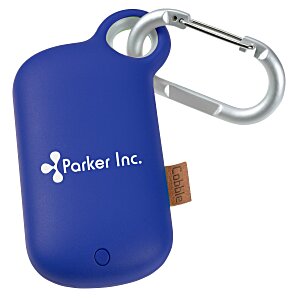
Ella’s above-referenced portable power bank, example shown below and likely specifications here, stopped taking a charging and giving a charge to other devices. It was a freebie from her Humane Society volunteer efforts. Since it was broken and never seemed to have a manufacturer warranty, I found it free game to open up and inspect. I started a guide for others considering opening one of these, which is rather easy. Anyway, please help improve the guide. As usual I didn’t take enough pictures and didn’t write enough describing what I did to repair it.

The battery cells inside the power bank appear to be fine, but the USB input and output ports had cracked solder joints at the PCB. No matter how I resoldered the ports, they appear destined to incur more stress than the PCB is designed for. I sealed it back up, but I suspect I’ll be back inside this thing before long. The output port seems most durable, but the input port flexes way too much.

Plugable BT-KEY3 Battery Replacement

Ella’s above-referenced portable and foldable keyboard stopped charging around near its third birthday. Since its manufacturer warranty had elapsed and it was broken and the manufacturer doesn’t sell or recommend any replacement parts, I found it free game to open up and inspect. While inside, I started a guide for others. Please help improve the guide, I didn’t take enough pictures and didn’t write enough describing what I did.

The great thing about gaining access to the inside of the keyboard is that I found a location to repurpose one of the hundred or so vape batteries I’ve accumulated over the last couple years. The vape battery I put in doesn’t use all the space that it could use, but that’s ok. It’s sort of a proof-of-concept and if it seems to work I’ll find a better matching battery later. Optimally I’ll find a 403525 (that’s 4.0 mm x 35 mm x 25 mm).

Precor 9.33i Repair

Liam was looking for a treadmill for winter workouts and he was considering new machines. With some persuasion, he acquiesced that we refurbish a free machine needing repair on Craigslist. In December, we found a Precor 9.33i for free down in Rosemount. With Finn’s strong back, the three of us headed there to haul it home on our trailer behind the Beetle. A week later, all of his roommates (plus Mikey) helped us move it to his apartment bedroom in the basement.

The machine immediately through error messages and sounded terrible. The error message didn’t seem to apply to our situation, so Liam cleared it by entering the treadmill’s diagnostics mode. When the treadmill fired up, it sounded horrible with a clunking noise. Finn heard it and recommended we replace the motor brushes (likely worn). We ordered a Mcmillan Motor Brush Kit SK-18553 from Treadmill Doctor and installed them and these completely eliminated the rumbling motor noise; however, any speed with a runner at 7 miles per hour or higher would automatically kick the motor off.

Using a multimeter we confirmed the motor’s high-amp load cut-off (designed for 16 amps) kicked in at 18 amps. Friction between the belt and the deck appeared to be contributing to this. Treadmill Doctor included free lubricant with our order, so we squirted that in. It helped reduce the friction draw a little bit, but it wasn’t enough and the machine still turned off at its high-amp draw at speed.

We then started talking to domestic companies selling replacement treadmill belts. The domestic replacement belts all require lubrication (every three to six months), which raised my suspicion – the original machine was designed for lubrication-less maintenance – I deemed these options as trash and likely to cause future problems, surely Precor’s engineers never designed their machines for trashy belts.

Germany manufactures wax-impregnated belts that seem like commercial grade belts. Importing the belts from Germany was going to impose tariffs and I wasn’t getting much support when I reached out to them.

Late in January we found Endurance Treadmill in Canada. One of their reps, Colten, personally responded to each and ever email message I sent to them, outstanding support! The order price incorporated a 20% tariff for the proper Thermoplastic Polyurethane (TPU) surface layer with an orange peel texture and a wax-impregnated polyblend & monofilament bottom surface belt for our 9.33i, totally worth it for the extra care Colten provided and the guaranteed and appropriate belt for our treadmill. Colten said most Precor treadmills operate with waxless decks and that Endurance’s replacement belt should be compatible with the Precor 9.33i. For removing Treadmill Doctor’s lubricant, Colten recommended paper towels and alcohol – this worked very well. After swapping the new belt in, Liam reports he and his buddies have been running on it for a month and it only needed a slight one-time tightening. Thank you, Endurance – this repair is a success!

Hopefully more people see this post, anyone with a similar Precor machine designed for maintenance-free operation should consider Endurance’s TPU belt. Belts from domestic manufacturers requiring lubricant are inferior.

3M Filtrete Refill Replacements

A 3M representative confirmed with me that they no longer offer refills for our reusable 3M Filtrete furnace filter frame that fits inside our American Standard furnace; however, I’m finding third-party replacement options:

Each of these replacement filters has 36-37 pleats (3M Filtrete frame accommodates up to 37) and is 15.55 inches wide (3M Filtrete frame accommodates 15.5 inches and maybe a little more). I will give one a shot and report back later.

Limited K-150 Diagnostics and Troubleshooting

We have an electronics recycling bin at my workplace’s building. Last spring, someone pitched a Keurig K-150 coffee machine in the bin. The machine looked mostly fine, so I proudly pulled it out and brought it home. After giving it power, I found it would cycle off if the power switch on its back was left in the downward depressed position and you tried to brew a cup of coffee. Surely it’s a capacitor?

While I haven’t opened the machine far enough to identify which capacitor is failing, I did figure out that if I replaced the machine’s power switch and placed it in an upward depressed position the machine would happily brew cups of coffee. Nice! I’d like to figure out which capacitor is failing, so that its switch can be placed in the downward depressed position, but I’ll take this workaround until I have more time.

I also found out the machine had brewed a couple thousand cups of coffee before I got my mitts on it. I’ve done another 200 cups since last spring. There are directions to access the machine’s diagnostics menu here – in short:

  • Hold down the center of the screen
  • Click brew 3 times in quick succession
  • Press brew to cycle through each menu

Our city recycler, Eureka, won’t recycle K-Cups. For my testing, composting the the grounds and filters in the backyard, the cups get hauled to the incinerator by our waste hauler. If I keep using this thing, I may switch to a reusable pod:

https://www.amazon.com/Stainless-Perfect-Pod-Micro-Etched-Compatible/dp/B084L54QQ7

Nest Gen 1 and No Longer Evil

My Nest Gen 2 has been working well since dropping NoLongerEvil firmware on it last month. I figured it was time to do the same with our Nest Gen 1 and then give it away to a lucky friend.

Since I still had access to the same Ubuntu 25.04 machine, I used that instead of try on macOS – to see how I configured it, read about my Gen 2 experience. For the Nest Gen 1, it took me close to a half hour to get the firmware to correctly load.

First, opening the Nest Gen 1 is really easy and Sparkfun’s guide is helpful. It’s a few screws and the shield flicks off easily with your fingernail, if you have them. I’m not sure how many cycles our Nest Gen 1 battery has seen, but you’ll have a good access to it at this time.

Second, loading custom firmware on the Nest Gen 1 requires shorting a pair of resistors kiddy corner to each other, which are small and their position relative to each other makes this a little bit tricky. Practice holding a pair of tweezers on these resistors and if you’re shaky find a friend to help. I had to practice this a little bit before getting the technique right.

Third, there’s a lot going on and not going on before the firmware can load. If you’re doing this on your own like I was, I found it best to place a small cloth on a table and lay the Nest face down on it. Before continuing, a requirement is that the Nest’s display must not be illuminated. Let it sit idle and eventually it should turn off. Once I could see the display was off and while steadily holding the tweezers to short the Nest’s resistors I completed the following sequence of events in this order: worked my way through NoLongerEvil’s web-install pages and clicked the link to make the browser look for a Nest Gen 1, pressed down on the Nest’s backside, slid the USB cable into the Ubuntu machine (before the display had turned off I had already plugged the USB mini-B into the back of the Nest), and then boom within a second or two there was confirmation the firmware was loading. You may fail a few times getting your computer to see the Nest before it loads the firmware. Seems timing is everything with this. Once I saw confirmation on the computer, I kept the tweezers shorting the resistors another 30 seconds before removing them, but I think you’re safe to remove them sooner than that.

Now that the Nest Gen 1 is jailbroken with NoLongerEvil, we will give it as a house-warming gift to a friend who bought a place nearby. Until then, we’ll keep it plugged into the USB mini-B cable so that it trickle charges. Should its internal battery ever die, it looks really easy to replace.

References:
https://github.com/lastowl/homebridge-nolongerevil-nest (this plugin works well with homebridge 1.1)
https://github.com/will-tm/homebridge-nolongerevil-thermostat (should my homebridge ever use MQTT)

Nest Gen 2 and No Longer Evil

After Google crippled my Nest Thermostat gen 1, I began exploring options to repair it. Fortunately I came across Louis Rossmann describing his FULU bounty and eventually learned about NoLongerEvil.com. I’m happy to report that their modified firmware has restored web functionality with my thermostat, though I should say I made a trade with my mom and scored her gen 2 model, which was also broken by Google and can be restored by NoLongerEvil.com.

A few gotchas, I never got the firmware hack installed from my Mac, rather a machine running Ubuntu 25.04 was useful. And the following lines of code needed to be executed from the terminal before the firmware could be installed:

sudo tee /etc/udev/rules.d/99-omap-dfu.rules << 'EOF' SUBSYSTEM=="usb", ATTR{idVendor}=="0451", MODE="0666" EOF

sudo udevadm control --reload-rules
sudo udevadm trigger

I'll report back later after a repair of my gen 1 thermostat is complete. Surely a friend would like to use it? Also, I love the AI feature built into NoLongerEvil.com, it made quick work of importing our old heating schedule, very impressive!

References:
https://github.com/lastowl/homebridge-nolongerevil-nest (this plugin works well with homebridge 1.1)
https://github.com/will-tm/homebridge-nolongerevil-thermostat (should my homebridge ever use MQTT)

2010 Mazda3 Key Battery Replacement

First of all, do not cheap out and buy your replacement batteries from eBay. Instead, buy them from someone reputable, like Digikey. I tried the cheap route and despite some new 1620 batteries arriving with 3.27 volts, they lack adequate amperage to power our Mazda3 keys.

Battery sourcing aside, this YouTube video does a good job of showing how to take a Mazda3 key apart. If you happen to snap any parts off and the keys don’t want to stay together, just dab some super glue blots, one each corner, and let the key dry. It will still come apart the next time you need to replace batteries.

When it comes to reprogramming, this guide may be helpful.

** Update 3-10-2026 **
Researching this with Digikey, it appears Murata (now owned/manufactured by Maxell) can put out over 1,000µA and Jauch can put out 650µA, whereas most other brands indicate approximately 100µA. I am ordering the Murata/Maxell (lithium manganese dioxide) model.

OpenVPN and DNS Fix

At some point I must have gotten cute with the OpenVPN’s client settings on macOS. I somehow entered OpenVPN’s “Advanced Settings” and enabled a feature called “DNS Fallback”. This seemed like a decent idea at the time, what I didn’t know is that would start to slow down my client-side OpenVPN connections a period of time after the VPN connection was established to the OpenVPN server. After this period of time, it would start to slowly (if ever) resolve domain names for external websites (the client side DNS resolution had latency on the order of seconds or more when it decided to use Google DNS.) Disabling the DNS Fallback feature brought speedy OpenVPN connections back to my client machine.

When these drop-offs or slow downs in resolving domain names occurred, the macOS OpenVPN client was producing these log messages: “UDP send exception: send: no buffer space available”. I will watch the log again to see if disabling the above “DNS Fallback” feature stops these UDP messages.